LTO Tracker – Check Your LTO Status Online in the Philippines
LTO Tracker
Check your vehicle plate status
e.g. ABC 1234, or your 15-digit MV file number
You don’t need to visit the LTO office again and again just to check your status. Now, you can do everything online in a few seconds.
With the LTO Tracker, you can check your plate number, driver’s license, registration, and application status from your home. You have a simple and fast way to check. It works on all devices including mobile or desktop.
You need to enter your details, then click check, and finally see your latest update within seconds.
Use the tracker above and check your status now!
What is an LTO Tracker?
LTO Philippines developed an online tracking system to monitor the progress of your requests, whether they are proceeding or not. The LTO plate tracker is a digital tool through which a vehicle owner checks the status of their LTO transaction from all over the Philippines.
The tracker helps you to get the updates that:
- Your plate number has been released
- Your driving license is ready or
- Your vehicle registration is active or not
- Your application is approved etc.
You get all the information about your vehicle online from the comfort of your home and don’t need to go to the LTO office and wait in long queues. It saves your time and is accessible on all devices via the internet connection.
What You Can Check Using the Land Transportation Office Tracker
The Land Transportation Office (LTO) Tracker serves the vehicle owners in multiple ways. You can use the tracker to:
Check Vehicle Plate # Release
When a vehicle owner buys a new vehicle, he receives a temporary number plate. He applies for the registered plate number by LTO and checks the status of their application through this tracker to verify if the physical metal plate has been manufactured and shipped to his authorized local LTO branch.
Track Driver’s License Status
You can monitor the status of your driving license whether it is active now or still has any pending appeals. You just enter your license number and check the status that your hard copy driving license is ready for printing or pickup.
Verify Registration Validity
You just enter your information and verify your vehicle registration is active or expired. Before any trip you can verify the status of your vehicle registration so that you can avoid your vehicle ban on the road.
Monitor OR/CR Availability
You can check your OR (Official Receipt) or CR (Certificate of Registration) is already available in the LTO database. Because these documents are necessary for any vehicle owner to be eligible to drive a vehicle on the Philippine’s roads.
Check Application Progress
If you have applied for a new license, renewal, plate number, or other LTO service, you can track the progress online. You get the information about the stages of the LTO process like submitted, under review, approved or completed.
Track Delivery of License or Plate
LTO also provides the facility of home delivery of the license or number plate. Through the online plate number tracker you can also track after dispatch whether your item is being processed, shipped, or already delivered.
Confirm Transfer of Ownership Status
When Filipinos buy or sell their vehicle they transfer the ownership in the LTO system. With this online system they confirm easily that the transfer process is completed and their vehicle record is legally updated.
How LTO Plate Number Tracker Works?
When you enter your details, such as your vehicle plate number, license number, or reference number, to check the status of your request for a particular item or document. Your request is processed in the LTO system. They review your details and search for your record in the LTO database. After confirmation, your status appears on your screen as the LO Tracker result.
Requirements To Use the Tracker
If you want to use the LTMS tracking tool you must have one of the following:
- Plate Number
- MV File Number
- Driver’s License Number
- OR/CR Number
- Application Reference Number
Note: To get the accurate result you should provide the accurate details. If you fill the form correctly your request processes quickly and completed on time. It avoids delays and facilitates the LTO system to review your application.
How to Check LTO Status Online (Step-by-Step)
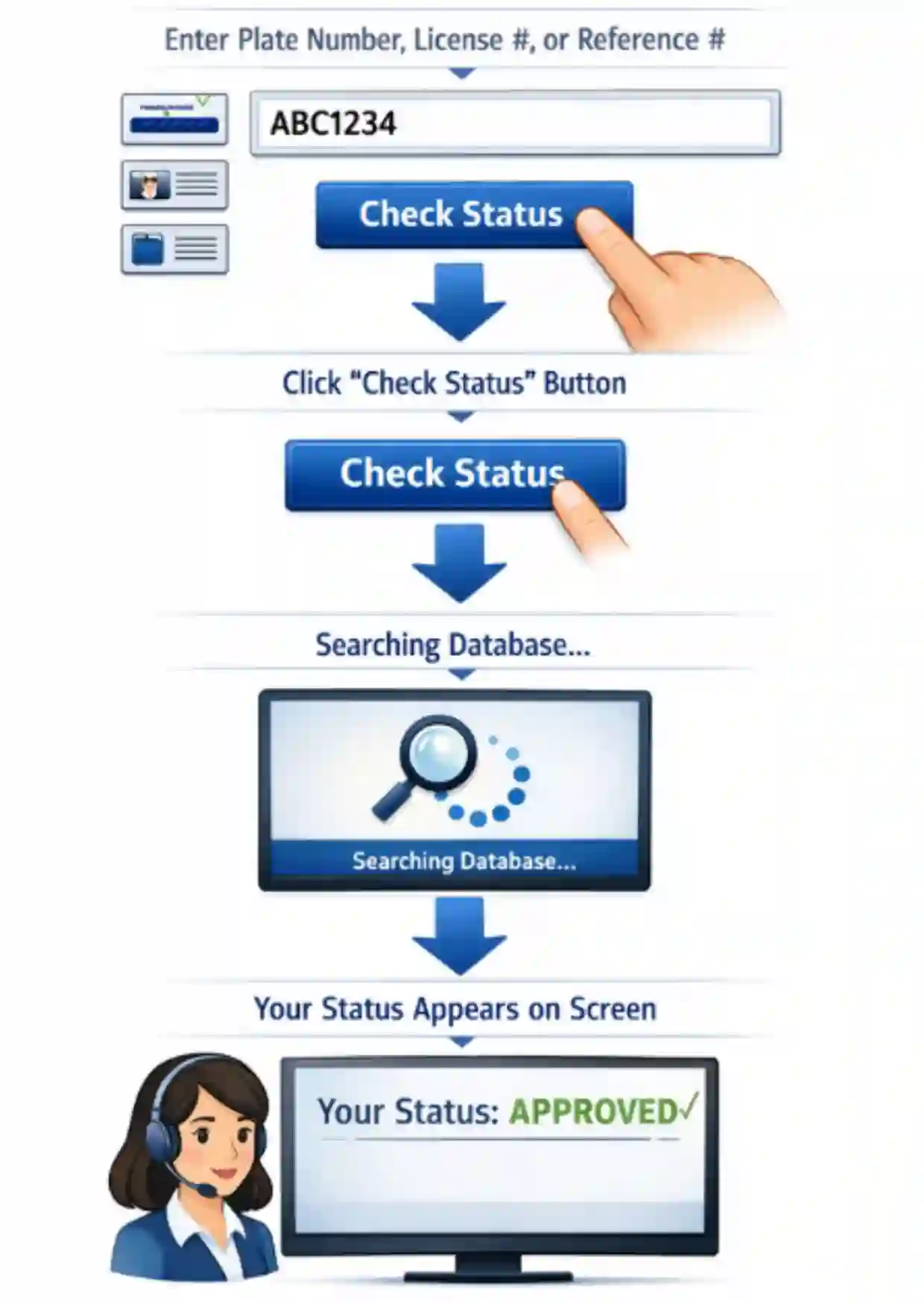
LTO status checker is a straightforward tool, you don’t need any technical skill to use it. You just have a few simple steps and your result will be on your screen. Here are the step-by-step guide to use the tracker:
Step 1:
Enter Plate or License Details
In the first step you have to type your plate number, license number, or reference number according to your need and availability of documents.
Step 2:
Submit Your Information
Next you have to click the “Check Status” button so that your request can proceed.
Step 3:
View Your LTO Status Result
Your record will appear with the latest available update by the LTO.
Benefits of Using an LTO Status Tracker Online
An Online LTO status checker is a useful tool for the Philippines citizens. People use it and monitor their vehicle record in the LTMS database without physically visiting the LTO office. When you use it, you avail the advantages of tracker in multiple ways such as:
Fast Status Checking
It gives you the fastest way to check the status of your LTO translation. If you confirm it by the physical visit then you consume a lot of time for travelling and even in the long lines outside the LTO office.
No Office Visit Required
LTO plate number check online is accessible for everyone so it allows them to monitor from anywhere in the Philippines. Filipino vehicle owners or drivers don’t need to visit the LTO office in person to inquire about their driver’s license or registered plate number availability.
Free Online Tracking
It is very convenient for you because it saves your traveling expenses or even calls charges to the LTO team. You can track online without paying a single penny. You just have to enter your details and your result shows on your screen.
Mobile-Friendly Access
One of the best features of this tracker is its compatibility. It is responsive on every device including mobile, tablet, or even Desktop. You can easily access it on a device you have in your hand right away.
Real-Time Updates
The digital database syncs directly with the LTO’s main servers that’s why when you use a tracker for LTO plate number verification online, the result shows directly on your screen as your plate number released, approved or in process. The result is based on real-time updates from the LTO.
For latest and accurate updates about your lto vehicle check you must visit the LTMS portal website. You have a complete vehicle record on that portal, so you can anytime verify what you need including your vehicle registration status, driving license validity or any LTO warnings.
Step-by-step Guide for License Plate Lookup Philippines
If you have requested for the new plate number Philippines and now want to check your application status that it is under process, your authorised plate number is released or ready for pickup. Here is the step-by-step guide to track your LTO plate inquiry via our tracker.
Steps for LTO Plate Inquiry:
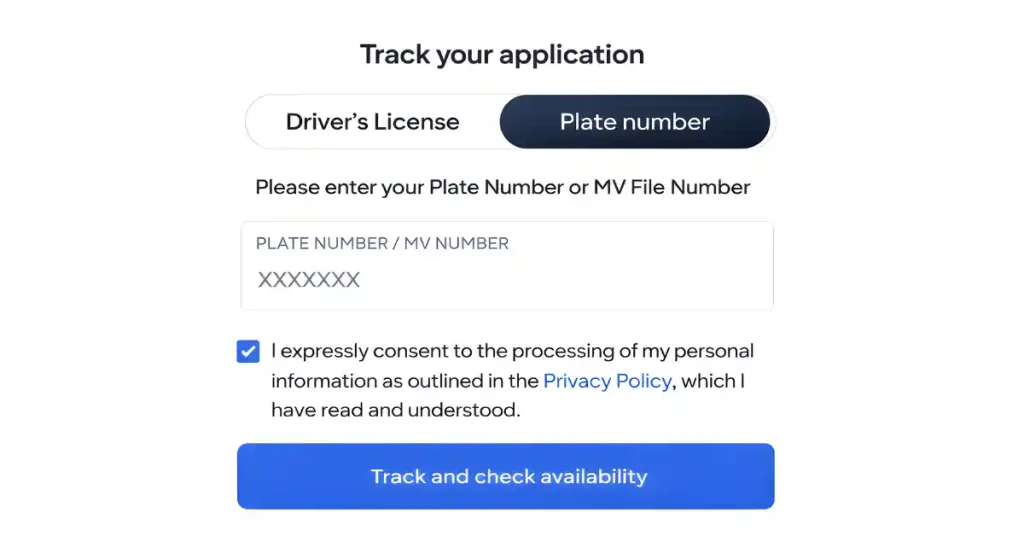
Step 1: Go to the Tracker tool above.
Step 2: Now click on the “Plate Number” section.
Step 3: Enter your plate number if available or you can perform MV File number search instead of plate number.
Step 4: Then agree to the terms and conditions and finally click the “Track and Check Availability” button.
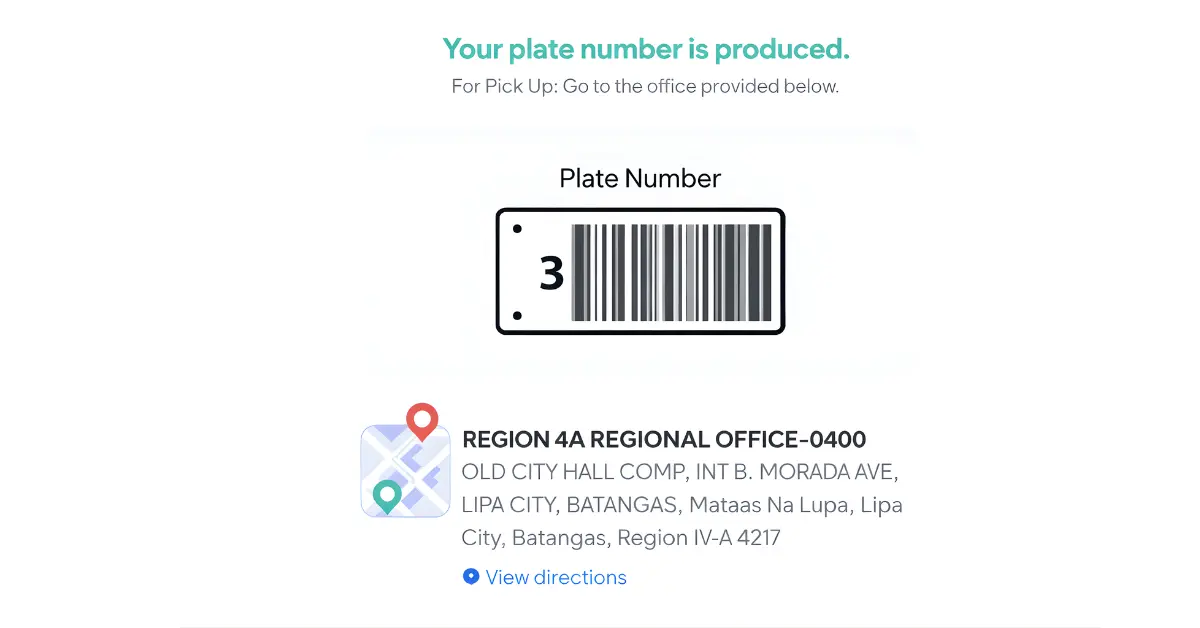
Step 5: Your result will be on your screen as your plate number is produced, under process or released.
Step-by-step Guide to Track Driver’s License Status
If you have already applied for your driving license and cleared your driving exam, you can check status through our tracking tool without visiting the LTO office repeatedly. Here is the step-by-step guide:
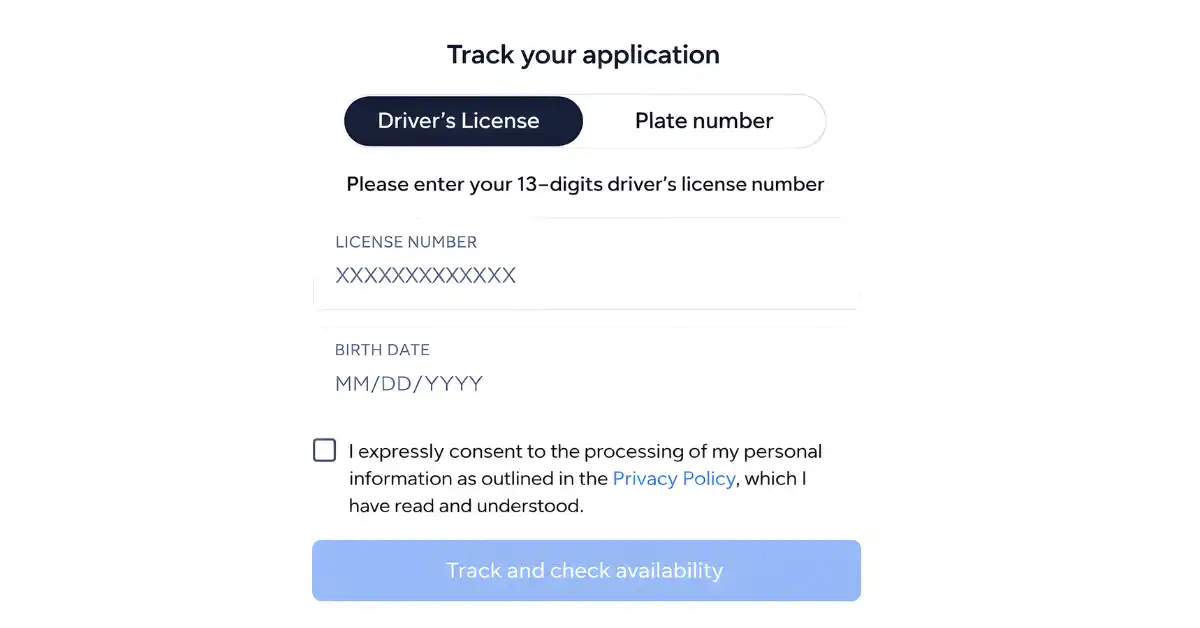
Steps to Follow:
Open the browser and type the “LTO Tracker” or you can directly check from the above tool on this page.
Now you have the driver's license section on your screen, if not, then click on the “Driver’s License” option.
Next, fill in the details carefully. First enter your 13-digit license number.
Now enter your correct date of birth.
Next, Agree to the terms and conditions and click on the “Track and Check Availability” button.
Your result will be on your screen, in process, ready for pickup or rejected.
LTO Home Delivery Tracking
After checking the status of your plate number or driver’s license, if the tracker shows ready for pick up results you can visit the office to pick up your item.
If you have chosen the home delivery option because LTO also provides the home delivery services then you can also check the status via LTO tracking system after dispatch.
Home Delivery Process
You have to fill the home delivery form accurately so that without any confusion or delay you can get your LTO documents safely at your door step. Here is the steps-by-steps instruction to track your home delivery service.
Steps to Follow:
Use LTMS Portal for Advanced Tracking
Filipinos need to create an account to login to the LTMS portal because some advance tracking is available on the LTMS portal. Vehicle owners register their vehicle in the LTO system online through the portal and get the latest update about violation, exam results and also manage their applications without visiting the LTO office.
How to Setup Your Account:
To login to the official portal you have to set up an account with your valid email address. Here we will guide you with a few simple steps:
Steps to follow:
First you will sign up for the portal with your active email and personal details.
Then provide your registered email and password and access your dashboard.
After login you must add your vehicle information using plate number or MV file number.
Note: You can read the full guide here: login to LTMS portal
Related LTO Services You Can Access with LTO Tracker
The tracking system not only helps you to check your vehicle status but it also connects you to other important LTO services. These tools make it easy to manage your vehicle records, license details, and legal requirements online.
Explore other helpful services along with the tracking tool:
Student Permit & Driver’s License Verification
Use the LTMS tracker tool to check your driver’s license status or verify your student permit details online.
Read our guide on Student permit requirements.
Transfer of Ownership Status Check
After buying or selling a vehicle, you can use the tracker to verify if the ownership transfer is completed and updated in the system.
Learn more about Transfer of ownership process.
LTO Violations & Penalties Lookup
You can quickly check if your vehicle has any violations, fines, or penalties through the LTO plate number tracker.
Check here: Check LTO violations online.
Check Driving Schedule by Plate Number
You can use your plate number to understand the coding rules and view window hours in your area.
Troubleshooting LTO License Plate Tracker Issues
Sometimes plate number finder Philippines is using a tracking tool but it shows some kinds of errors. It is a common problem, you have to stay calm and try again with proper information. Here we are discussing a few common issues along with their possible causes and solutions:
No Record Found
If you see “No Record Found”, it means your record is not successfully recorded in the LTO database. You have to check your application and double-check the information you have put in. You should try again after some time.
Incorrect Details
Sometimes typing mistakes can cause this error. Tracker uses correct and accurate data as your registered documents. You should check your license number, plate number or reference number and try again with correct information. You should use the same format as your original documents.
Delayed Status Update
Your application status will take time to update after you submit your application. The processing time requires you to wait because updates need several days to complete. Your application status will display outdated information when you check it before the designated time.
System Not Loading
If you encounter a “system not loading” error then you have to check your internet connection or reload the page. Because this error occurs due to slow internet singles or maybe there is a temporary system maintenance issue. So you have to wait for some time and also reconnect your internet with a strong network.
Tips for Accurate Results
Before using the tracker online you have to follow some useful tips to get the accurate results. So, you can avoid any mistakes while entering your details according to the Land Transportation Office records.
Double-check numbers
You should provide the exact number. You have to double-check the number before submitting your request. Because sometimes you may make mistakes in a digit and get the wrong result. For example you have to enter the motorcycle plate number, reference or license number and if you miss any digit then the system will not be able to show you the actual result.
Use correct format
You need to follow the exact format based on your documents, because some entries require dashes, spaces, or specific letter placement. The system will generate errors when you enter data in the wrong format although your numbers appear to be correct.
Wait for processing time
After you apply for a service, you must wait for enough time until the system completes its update process. Status information may not appear immediately. You have to wait until the standard processing period ends because checking results too early will show you incomplete information.
Use official data
When you are tracking the status of your request you must gather required documents before using the LTO Tracker. It will be helpful for you to enter accurate information according to your registered documents, so that the tracker can represent the accurate result and avoid any error.
LTO Customer Service & Hotline number
There are thousands of searches for “LTO near me”. People want to visit directly to the LTO office but if you have any issue with your tracking and you want to ask directly to the LTO officer, you can call them or visit physically to the LTO Office.
For minor queries you can visit your nearby LTO office. Here we are sharing a central office address or contact number but you have to remember one thing that LTO has multiple offices and region-wise branches across the Philippines. And all these offices have their own contact/mobile numbers so you should look for it on the LTO Directory online.
LTO Central Office Contact Information
| Office | Details |
|---|---|
| Office Name | LTO Central Office (Quezon City) |
| Address | East Avenue, Quezon City, 1100, Metro Manila – Philippines |
| Customer Feedback Email 1 | [email protected] |
| Customer Feedback Email 2 | [email protected] |
| Customer Feedback Email 3 | [email protected] |
LTO Central Hotline
| Contact Type | Number |
| Central Command Center / Hotline | 1-342-586 |
| Direct Line | (02) 8926-4696 |


Conclusion
The LTO Tracker is a convenient online solution for checking license, plate number, registration, and application status. It helps users avoid office visits and stay informed. By using the number tracker in the Philippines, you can quickly monitor your LTO records and get updates anytime.
Use our LTO tracker and check your plate number or driver’s license online in the Philippines.